



Advanced Forms Pro for ACF 1.9.3.6
Original price was: $19.99.$9.99Current price is: $9.99.
ACF Custom Database Tables 1.1.3
Original price was: $19.99.$9.99Current price is: $9.99.
-50%
-
 100% Original - All Premium Features Included.
-
 Unlimited Site & Domain Usage
-
 Safe & Secure


Related Products

Elementor PRO WordPress Page Builder + Pro Templates 3.34.0
In stock
Original price was: $19.99.$9.99Current price is: $9.99.


WoodMart Theme Responsive WooCommerce WordPress Theme 8.3.9
In stock
Original price was: $19.99.$9.99Current price is: $9.99.

Wordfence Premium – WordPress Malware Scanner 8.1.4
In stock
Original price was: $19.99.$9.99Current price is: $9.99.

Astra Pro Addon For Astra Theme 4.12.1
In stock
Original price was: $19.99.$9.99Current price is: $9.99.

PlugCart –
User Activity Log PRO for WordPress Latest Version
This is a GPL-distributed version. No official support. Clean, secure, and legally redistributed under the GPL license.
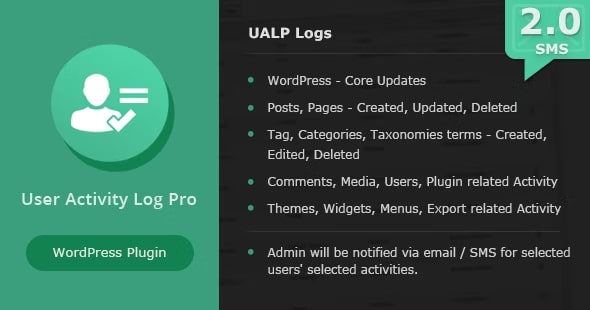
User Activity Log Pro WordPress plugin is a powerful monitor system to track your users and team activities. It helps you with WordPress core updates, Posts & Pages updates, User activities, etc. which are done on the admin side for any WordPress powered website.
When User Activity Log Pro useful for you?
Track your Freelancers or Hire Developer’s activities
Track your multiple Blog Author’s changes
Track who has logged in with the site and when
View successful login and logout attempts
Track which IP addresses are targeting your login page
Track which themes, plugins and core files are updated in your absence time
For whom User Activity Log Pro is useful?
Most needed for Website Owner
Product Manager, Site In-charge or Site Manager, Team Leader, Developers
IT companies to track multiple developer’s behaviours
IT Consultants, Freelancers
User Activity Log PRO for WordPress GPL Features:
1. ADMINISTRATIVE ACTIVITY TRACKING
Sometimes users are thinking about as I can do anything with the website if I have some upper-level passwords and no one can track me. But now, you can put the guys as off and feel them as you are also in track-able mode. No single person will miss user tracking including admin users.
2. PASSWORD SECURITY TO DELETE LOG
If you have already shared your admin passwords to your developer or freelancers. They can’t remove/delete or download that log summary or any single log until they have a master password of the User Activity log. We are providing high security to care for your log data.
3. EMAIL TRACKING
Whenever selected user role users are logged in with the website then you will automatically notify via email. The system will generate one email and will send it to your selected addresses.
4. WP SETTING TRACKING
Sometimes we suddenly notice that our WordPress back-end settings were changed by someone else. When do we ask freelancers or developers or other team members, who made these changes? But there is no reply. So how to track who made these changes? The answer is User Activity log PRO report shows all log with details.
5. DOWNLOAD ACTIVITY LOG BEFORE DELETE
This is must needed solution required as you want backup of selected log but don’t want to show that log with Activity Log list for another users. You can download your single & multiple selection logs anytime, no copy-paste required.
Other useful features :
USER DETAILS TRACKING
Users need to change some details related to their own profiles and new details might create an impact on our website like first name, last name, website link, email address, etc. If any user changes their own user-related details then you will also get tracking about that changes.
FAVORITE/UNFAVORITE LOG
You can set some filters on the log from your side as my favourite log and it will be easily accessible for future usage.
Who can access the User Activity Log Pro panel? There is one “Role Manager” tab option available under the settings page and you can assign that stuff to Contributor, Editor or one of your website Custom Role.
ACTIVITY LOG SORTING OPTIONS
You can sort out activity log list based on Date, Author, IP Address, Hook, Type, etc. then you can do that thing easily with ascending and descending order.
ACTIVITY LOG FILTERING OPTIONS
You can filter out the activity log list based on Date, Author, IP Address, Hook, Type, etc. same as sorting and one more feature option is available as favourite/unfavorite log.
USER-FRIENDLY ADMIN PANEL
Easiness with the backend panel is the first requirement of any plugin and we have already understood that thing. So, beginners can also start website tracking.
LOG RESET OPTION
Options to reset your activity data anytime via the “Delete Log Activities” option. That will remove your all activities data with the download and email option.
EMAIL NOTIFICATION
If you want an instant email in your Email Inbox when selected users or selected user role’s users are Logged-in with the website. You can customize your email body too.
EXPORT LOG TO CSV FILE
User Activity Log Pro plugin provides you with an option to export log data into CSV file format. So, you can easily read for your next future usage.
HOOK SELECTION OPTION TO TRACK SELECTED ACTION
No need to track all activities? No worry, we are providing a large number of options as you can select a checkbox for posts, pages, media, categories, tags, etc.
CUSTOM POST TYPE & CUSTOM TAXONOMIES SUPPORT
User Activity Log Pro compatible with custom post types and custom taxonomies. You have some custom post types like portfolios, testimonials, etc. and worrying about that tracking then this is a best solution for you.
ROLE MANAGER FEATURE
Who can access the User Activity Log Pro panel? There is one “Role Manager” tab option available under the settings page and you can assign that stuff to Contributor, Editor or one of your website Custom Role.
VIEW LOG IN DETAIL
We are familiar with revision post type in WordPress and that will store you all revisions but if you want to delete anyone selected revision then you can’t do it. User Activity Log doing that same stuff but you can select for which post type you want to track and only selected post type start tracking with page contents.
Blog website owners can use User Activity Log Pro as like SVN, github, etc. as project synchronize tool for multiple blog authors.
CUSTOM EVENT LOG
You are really happy with the current plugin’s functionality but still want to add some more stuff from your side. We have already figure out that requirement also and added that support also.
Below are arguments to add custom event log to track your custom events/actions :
Event Name (Hook Name)
Event Label
Event Type
Event Description
There are no limits to adding your custom event log entries. You can add thousands of event hooks and can track everyone.
SUPPORTED PLUGINS
With the popularization of plugins usage, we have filtered out and selected some useful plugins and provided inbuilt support with the User Activity Log Pro plugin. You can add your plugins support via the above feature – “Custom Event Log”
WooCommerce
Easy Digital Download
bbPress
Advanced Custom Field (ACF)
Contact Form 7
Gravity Form
Yoast SEO
Wordfence
Blog Designer PRO
Autoptimize
All in One Reservation
Portfolio Designer
User Switching
Users Ultra
WC Checkout Fields Editor