



WPForms PDF Addon 1.1.0
Original price was: $19.99.$9.99Current price is: $9.99.
Bricks Next Bricks | Brickscore 2.2.3
Original price was: $19.99.$9.99Current price is: $9.99.
-50%
-
 100% Original - All Premium Features Included.
-
 Unlimited Site & Domain Usage
-
 Safe & Secure


Related Products

Elementor PRO Original Lifetime Last Version
In stock
Original price was: $39.99.$19.99Current price is: $19.99.


WoodMart Theme WordPress WooCommerce Last Version
In stock
Original price was: $19.99.$9.99Current price is: $9.99.

Wordfence Premium – WordPress Malware Scanner 8.1.4
In stock
Original price was: $19.99.$9.99Current price is: $9.99.

Astra Pro Addon For Astra Theme Last Version
In stock
Original price was: $19.99.$9.99Current price is: $9.99.

PlugCart –
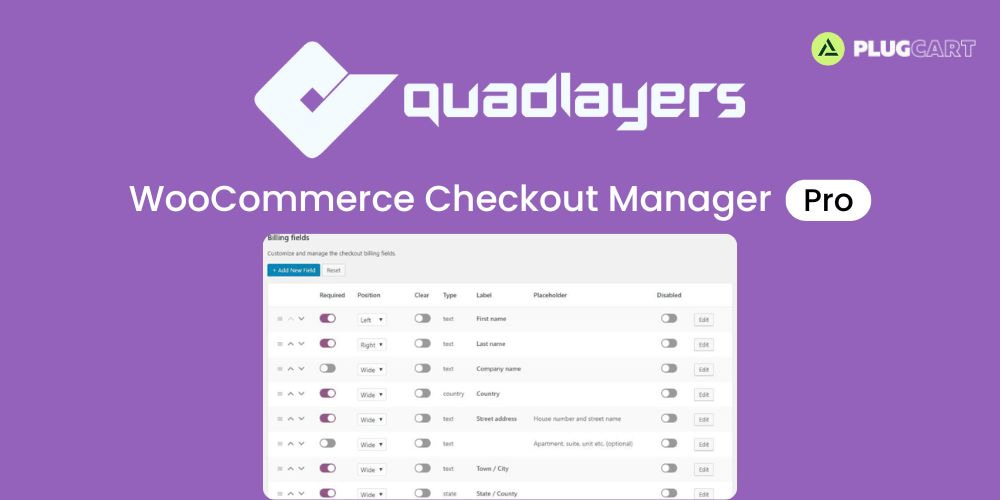
WooCommerce Checkout Manager PRO Latest Version
This is a GPL-distributed version. No official support. Clean, secure, and legally redistributed under the GPL license.
Checkout Manager for WooCommerce is an excellent tool to increase your conversion rates and boost your sales.
It allows you to add, edit, customize, and delete fields on the checkout page.
Add new fields to checkout
Include custom fields to the checkout page in Billing, Shipping and Additional fields sections.
Billing fields section
Include or remove fields in billing field section.
Shipping fields section
Include or remove fields in shipping field section.
Additional fields section
Include additional fields section in the checkout form.
Add new fees to checkout
You can include fees to each custom or core field.
Add percentage or fixed fees
You can include a fixed or percentage fee to the checkout to any custom or core field.
Add fees to single options fields
You can include a fixed or percentage fee to each option of the select and radio fields.
Add fees to multiple options fields
You can include a fixed or percentage fee to each option of the multiselect and multicheckbox fields.
Edit core fields
Our plugin allows you to edit core fields in the Billing and Shipping sections. You have the option to provide new values for type, name, placeholder, class, default, etc.
Conditional fields
Show fields based on parent field values and improve the checkout user experience.
Conditional parent
Select the conditional parent field and hide the current field based on the parent value.
Conditional parent value
Our system detects the parent field type and allows you select the value based on the available options.
Remove checkout fields
You can easily remove the unnecessary fields and reduce the checkout form. Also, you can disable fields for certain products, product categories or user roles.
Upload files
The upload file type allows your users to upload any file type during the purchase process.
Edit uploaded files in admin dashboard
The shop manager can easily handle the files the users upload through the admin order dashboard.
Allow users to handle uploaded files
You can allow your users to handle their own uploaded files through the order section on the My Account page.
Edit uploaded files in the admin dashboard
The user can upload or delete fields from the order page.
Show custom fields in order
You can include a section on the received order to display the values of the custom fields completed during the purchase process.
Email notifications
Include custom fields in the email that the user receives after completing the purchase process.
Filter by order status
You can select the status of the order to display the custom fields.
Filter each field individually
You can disable the fields you don’t want to include in the emails.