



Calculated Fields Form Pro 5.8.63
Original price was: $19.99.$9.99Current price is: $9.99.
PeepSo Gecko Theme 8.0.0.0
Original price was: $19.99.$9.99Current price is: $9.99.
-50%
-
 100% Original - All Premium Features Included.
-
 Unlimited Site & Domain Usage
-
 Safe & Secure


Related Products

Elementor PRO Original Lifetime Last Version
In stock
Original price was: $39.99.$19.99Current price is: $19.99.


WoodMart Theme WordPress WooCommerce Last Version
In stock
Original price was: $19.99.$9.99Current price is: $9.99.

Wordfence Premium – WordPress Malware Scanner 8.1.4
In stock
Original price was: $19.99.$9.99Current price is: $9.99.

Astra Pro Addon For Astra Theme Last Version
In stock
Original price was: $19.99.$9.99Current price is: $9.99.

PlugCart –
Divi Ghoster White Label Divi Plugin Features:
Replace Every Traces Of Divi Or Extra On Your Website
Add your own custom branding and make the Divi or Extra theme magically disappear. Divi Ghoster hides every trace of your theme from competitors or bots using inspect tools, and clients or members snooping around the backend.
Take Over The Divi Or Extra Theme And Rebrand Without A Line Of Code
Give your client sites a finished look with complete brand repackaging.
Replace the default Divi or Extra theme name
Change the author name and add a branded thumbnail image
Rebrand the Divi Builder to match your client’s brand identity
All future updates will appear as updates to your custom branded theme with no mention of Elegant Themes, Divi, or Extra
Offer backend rebranding packages and make more money for your agency
Hide All Or Some Of The Divi Theme With Ultimate Ghoster
Hide access to Premade Layouts, Products Tours, and other styling options in the Divi menu with a simple checkbox. Ultimate Ghoster also lets you hide Divi-related plugins such as Divi Switch, Divi Bars, Divi Booster, and Divi Ghoster itself.
Hide Divi or Extra-related options from your clients and protect your site from accidental or malicious changes.
Customize The Divi Menu Items From The Dashboard
Hide items from the Divi menu that your clients or team members do not need. With Ultimate Ghoster, you can choose to enable or disable multiple menu items in the Divi menu such as the Divi Theme Options, Theme Builder, Theme Customizer, the Role Editor Page, Divi Library, and Support Center.
Work Seamlessly With Divi And Extra Child Themes
Divi Ghoster is compatible with both the Divi page builder and the Extra themes, as well as any child themes used for styling.
Change The Theme Slug And Become Undetectable
Change the theme slug with ease so if someone inspects your website’s source code, the Divi or Extra theme will not be displayed; instead, your custom text will display.
Customize The Divi Builder
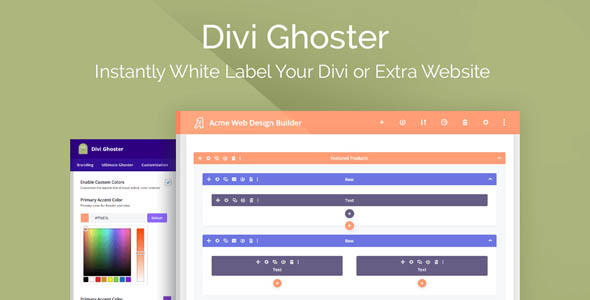
Make the Divi builder yours with custom colors for the backend page builder, the visual builder, Divi theme options, your theme builder page, and the role editor.
Use the built-in color selector or enter the hex values of your client’s colors to give the Divi Builder a completely new feel.
Hidden From Just About Every WordPress Detector Tools
Activate Divi Ghoster to trick theme detectors so your theme displays as undetected. Baffle your curious onlookers, competitors, or bots looking to exploit vulnerabilities. Give the Divi builder a proprietary look and feel for added security and improved branding.
Hide WordPress Menu Items From The Dashboard
Ghoster isn’t just for Divi, remove any of the default WordPress menus including Appearance, Settings, Tools, Projects, Plugins, and Updates.
Give Your Theme A Whole New Identity
Change the name of the Divi or Extra theme, replace the author, give it a custom thumbnail, and make it so all updates appear as updates to your custom branded theme with no mention of Elegant Themes, Divi, or Extra.
Hide The WordPress Logo And Footer
Take your stealth tactics a bit further and disguise your use of WordPress in development. Divi Ghoster will hide the default WordPress logo and also remove the ‘Thank you for creating with WordPress’ footer at the bottom of each page.
Hide The Default Dashboard Widgets
Customize your dashboard page with just a few clicks, including hiding the default WordPress widgets. This feature is quick and easy to use and makes your dashboard clean and less confusing for new users.
Create A Custom Dashboard With The Divi Builder
Simplify the user interface and add your personal touch to your site with a custom admin dashboard and welcome screen. With Divi Ghoster, you can use the Divi Builder to create and set a new page as the dashboard screen. Give your client direction, add quick links to publishing tools, improve back-end navigation, or display a support form.
Design A Custom Login Experience For The WordPress Login Page
Divi Ghoster’s built-in Login Customizer lets you redesign the login page so that it becomes another brand contact point. With the Login Customizer, you can replace the WordPress logo, add a background image, change the background color, edit the look and feel of the details entry box and update various text display styles.
Import And Export Ghoster Settings to All Your Sites
Save a ton of time by setting up a template and using the Ghoster importer! Divi Ghoster’s settings can easily be exported and imported into a new site build. This saves you from having to reconfigure plugin settings for each new site installation so that you can focus on other aspects of running your business.