




Real Estate Pro – WordPress Plugin 2.1.2
Original price was: $19.99.$9.99Current price is: $9.99.
LearnDash Course Grid Addon 2.0.10
Original price was: $19.99.$9.99Current price is: $9.99.
-50%
-
 100% Original - All Premium Features Included.
-
 Unlimited Site & Domain Usage
-
 Safe & Secure


Related Products

Elementor PRO Original Lifetime Last Version
In stock
Original price was: $39.99.$19.99Current price is: $19.99.


WoodMart Theme WordPress WooCommerce Last Version
In stock
Original price was: $19.99.$9.99Current price is: $9.99.

Wordfence Premium – WordPress Malware Scanner 8.1.4
In stock
Original price was: $19.99.$9.99Current price is: $9.99.

Astra Pro Addon For Astra Theme Last Version
In stock
Original price was: $19.99.$9.99Current price is: $9.99.

PlugCart –
Learndash Dashboard
Whether you’re an admin, a course instructor or a learner, you’ll require a clean dashboard where you can manage everything related to your courses and lessons in a better way. It not only helps them manage their courses and lessons, but it also increases the interaction with your e-learning website. And, that’s what LearnDash Dashboard Plugin does!
The best alternative to LearnDash Propanel with much more enhanced features.
LearnDash demo site
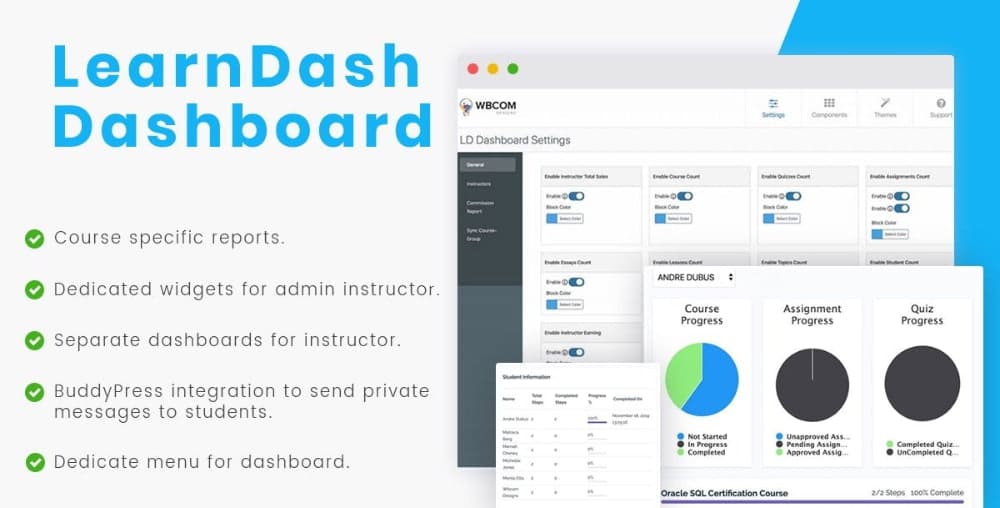
Learndash Dashboard Plugin gives a separate dashboard to admin, instructors, and students. Using, this dashboard, they can perform and adjust each block as per their requirements. By using their own dashboard, they can easily manage their courses, lessons, and contacts. This plugin allows you to easily disable any section if you want to do so. Using the Learndash Dashboard plugin, you can align, color, and re-position each block. You can also add instructor roles and register an instructor using a form. Commission distribution feature and it also provides the instructor in interactive graphs to manage their roles.
Easy Contact Management
Import existing leads in a few clicks, map all information easily, get a complete activity history, and get personalized engagement analytics for every contact.
Advanced Email Builder For Stunning Emails
Use our drag-and-drop builder to create visually stunning emails that stand out in your user inbox.
Run Single Campaigns & Strategic Email Sequences Easily
Design single emails or set up complete email sequences without switching multiple tabs.
Organize Your Leads Into Lists & Segments
Assign your contacts to specific lists and tags, and create segments based on any contact data to run personalized email campaigns easily.
Noteworthy Features of Learndash Dashboard Plugin
For Course Instructors & Group Leaders
1. Separate Dashboard
This plugin offers a separate dashboard for course instructors and group leaders that display earnings, the number of courses, quizzes, completed assignments, and pending essays. It also displays the lessons and topic count and the number of students enrolled in the courses.
2. Course Details
The plugin allows instructors and group leaders to analyze course progress in the form of a pie chart. They can see the information of each student based on each course. Such information includes total steps, completed steps, progress, and completion date.
3. Send Messages To Students
This plugin allows course instructors and group leaders to send messages to their students. It displays the message in a multi-threaded conversation and students can also reply to this conversion.
4. Email Option
The course instructors and group leaders can send emails to the students directly from their own dashboard. From the dashboard, they have to select the course names, student names, add email subject and description and hit the send button to send email notifications to students.
5. Display Student Details
Instructors and group leaders can see all the details of their students from a single place. Such details include the course progress, assignment progress, and quiz progress respectively.
6. Activity Feed
An instructor Dashboard and Group Leader Dashboard will also display live notification of any activity performed by him or his students.